
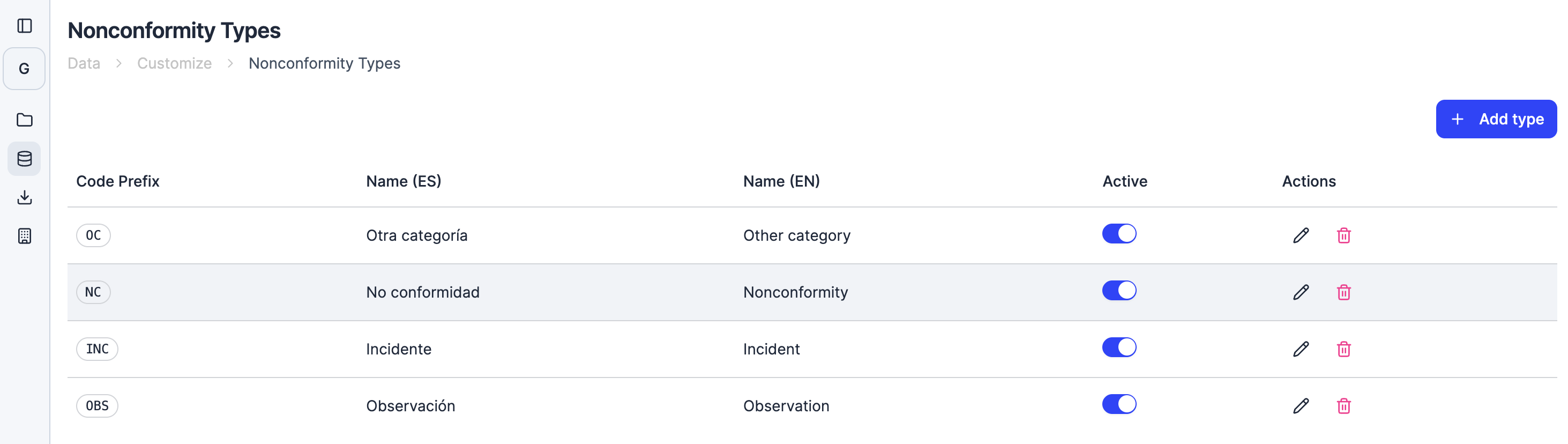
A taxonomy that fits your processes
Nonconformity management is at the heart of any ISO management system: ISO 9001, ISO 14001, ISO 45001. The platform previously offered three built-in types: Nonconformity, Incident, and Observation. Now your organization can define its own types and align the platform with how your team actually works.
What you can do
With nonconformity type configuration, you can:
- Create new types with English and Spanish labels, a code prefix, and a display order
- Edit existing types to update their label or prefix as your internal terminology evolves
- Deactivate types you no longer use without losing historical records
- Rely on built-in protection against accidental deletion: the system blocks deleting a type that has linked nonconformities and asks you to deactivate it instead
How to access it
Nonconformity type configuration is available to organization administrators in the Management Systems section. Go to your organization settings and look for the nonconformity types panel, where you can manage all types available to your team.
The three default types (Nonconformity, Incident, and Observation) remain available as a starting point. You can keep them as they are, modify them, or add new types that match your organization’s needs.